<?xml version="1.0" encoding="utf-8"?><feed xmlns="http://www.w3.org/2005/Atom" ><generator uri="https://jekyllrb.com/" version="3.10.0">Jekyll</generator><link href="http://dandobrick.com/blog/feed.xml" rel="self" type="application/atom+xml" /><link href="http://dandobrick.com/blog/" rel="alternate" type="text/html" /><updated>2026-01-22T03:20:39+00:00</updated><id>http://dandobrick.com/blog/feed.xml</id><title type="html">Dan’s &lt;s&gt;Tech&lt;/s&gt; Blog</title><subtitle>Very infrequent posts about whatever I have going on</subtitle><author><name>https://dandobrick.com/</name></author><entry><title type="html">Good Enough</title><link href="http://dandobrick.com/blog/posts/good-enough/" rel="alternate" type="text/html" title="Good Enough" /><published>2025-06-11T00:00:00+00:00</published><updated>2025-06-11T00:00:00+00:00</updated><id>http://dandobrick.com/blog/posts/good-enough</id><content type="html" xml:base="http://dandobrick.com/blog/posts/good-enough/"><![CDATA[<p>I recently saw some photos of woodworking online that I really liked. The pieces looked professional, nicely finished, and exactly the kind of thing I’d love to build myself someday. I started to plan out the build in my head, and as I did, I zoomed into the joinery to see how things were built and I was a bit surprised…</p>

<!--more-->

<p>The joints weren’t flush, the sanding left visible marks in places, and there were gaps where pieces should have come together seamlessly. The piece as a whole looked pretty, professional, and high-end, something I assumed would be pricey if I were to purchase it at the store, but the techinque wasn’t at the level I expected.</p>

<p>Now, I’m not sharing this to criticize someone’s work; quite the opposite actually. This discovery gave me a nice little confidence boost.</p>

<h2 id="we-are-our-own-worst-critics">We Are Our Own Worst Critics</h2>

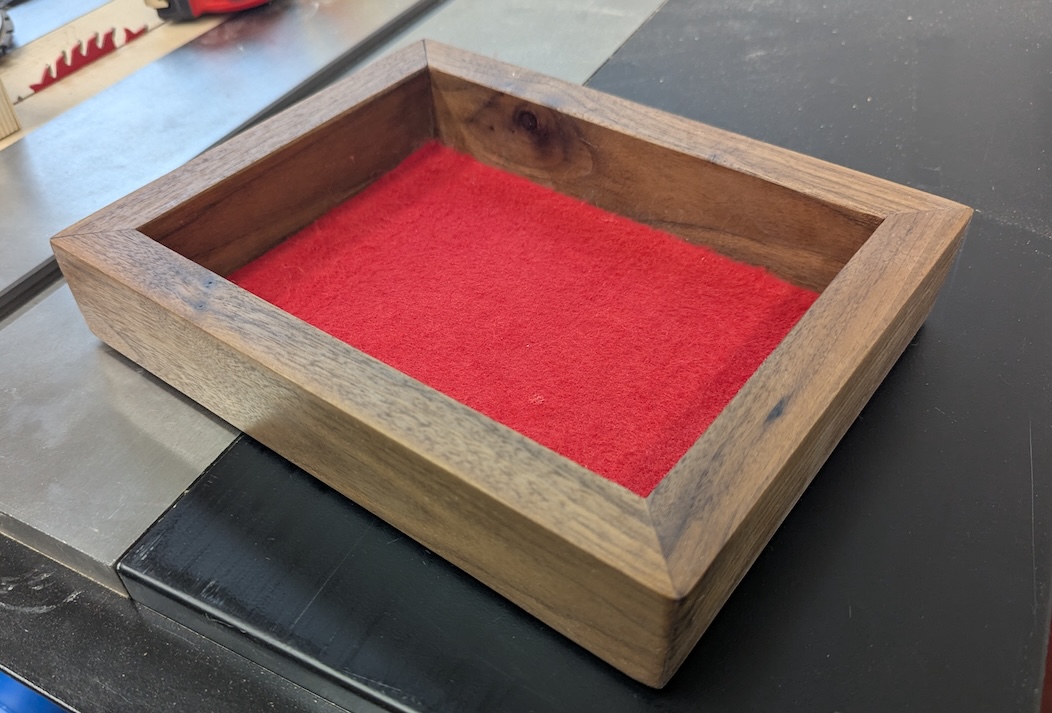
<p>I’ve been working a gift for my brother who lives across the country: a dice tray for his D&amp;D games made out of some leftover walnut I had. The plan was simple: practice my miter joints, make something I think he’d like and ship it across the country.</p>

<p>The miters… well, they’re not what I’d call my finest work. There are gaps, the angles aren’t quite the perfect 45 degrees they should be. The sides are <em>slightly</em> different lengths. It’s functional, sure, but I wasn’t particularly happy with it. After gluing it up and seeing the joints, my plan was to finish it, slap some felt to the bottom and send it on its way. Out of sight, out of mind. My brother would appreciate the gesture, and I’d never have to look at the gaps in those joints again.</p>

<p>This wasn’t a disaster by any means; it was more of a “well, that’s disappointing” situation. Not bad enough to scrap, but not good enough to display proudly either. Just… fine. Adequate. Good enough.</p>

<p>But then I saw those photos I mentioned. Professional-looking work with gaps and imperfect joints. And something clicked.</p>

<h2 id="a-shift">A Shift</h2>

<p>When you’re deep in the details of creating something, you become intimately familiar with every compromise, every shortcut, every place where reality fell short of your vision. But those viewing the finished product? They see the whole, not the sum of imperfect parts.</p>

<p>The next day, I went back to my workshop and looked at that dice tray differently. Yes, the miters weren’t perfect and it’s for sure not square, but the wood is really pretty and you can only tell it’s askew if you look for it. The overall construction was solid. It would absolutely serve its purpose during game nights.</p>

<p>More importantly, I realized I’d been so focused on the gaps that I’d missed what I’d actually accomplished. This was a handmade gift, crafted with care, even if not with perfect precision. My brother wasn’t going to inspect the joints with a magnifying glass - he was going to roll dice in it while playing games with his friends.</p>

<p>So I decided to shift my approach. Instead of rushing to finish and ship it off, I took my time with the final touches. I filled in the gaps so you can’t see them as much, I was more careful with the sanding and more thoughtful with the finish. The flaws are just things I would see and not something that even matter; it’s solid, good looking and works well!</p>

<p><em>The finished dice tray - imperfect miters and all</em>
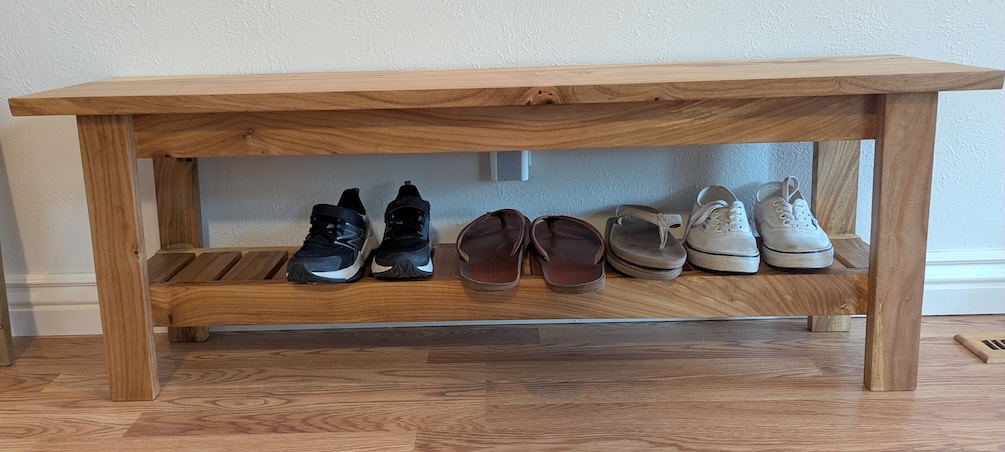
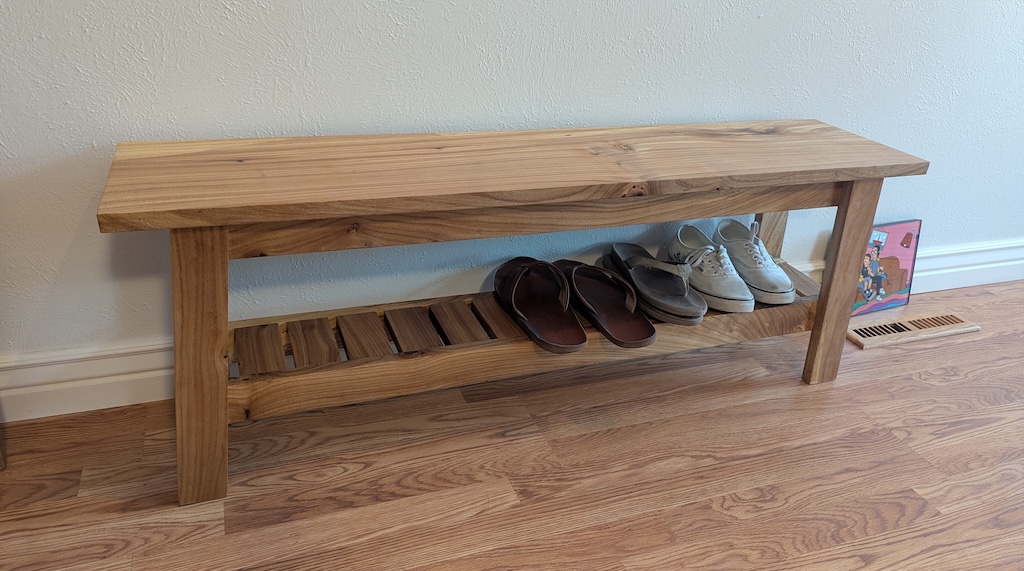
<img src="/blog/assets/images/posts/good-enough/completed-dice-tray.jpg" alt="The completed dice tray" class="img-responsive" /></p>]]></content><author><name>https://dandobrick.com/</name></author><category term="woodworking" /><category term="craftsmanship" /><category term="reflection" /><category term="diy" /><summary type="html"><![CDATA[I recently saw some photos of woodworking online that I really liked. The pieces looked professional, nicely finished, and exactly the kind of thing I’d love to build myself someday. I started to plan out the build in my head, and as I did, I zoomed into the joinery to see how things were built and I was a bit surprised…]]></summary></entry><entry><title type="html">I made this bench; I’m proud of it</title><link href="http://dandobrick.com/blog/posts/i-made-this-bench-i'm-proud-of-it/" rel="alternate" type="text/html" title="I made this bench; I’m proud of it" /><published>2025-06-02T00:00:00+00:00</published><updated>2025-06-02T00:00:00+00:00</updated><id>http://dandobrick.com/blog/posts/i-made-this-bench-i&apos;m-proud-of-it</id><content type="html" xml:base="http://dandobrick.com/blog/posts/i-made-this-bench-i&apos;m-proud-of-it/"><![CDATA[<p>I built a bench, and I’m proud of it! I modified a design that I had previously used for a coffee table and got the wood from a local lumbermill in my town. Check it out!</p>

<!--more-->

<p><img src="/blog/assets/images/posts/i-made-this-bench-i'm-proud-of-it/finished-bench.jpg" alt="The finished bench" class="img-responsive" /></p>

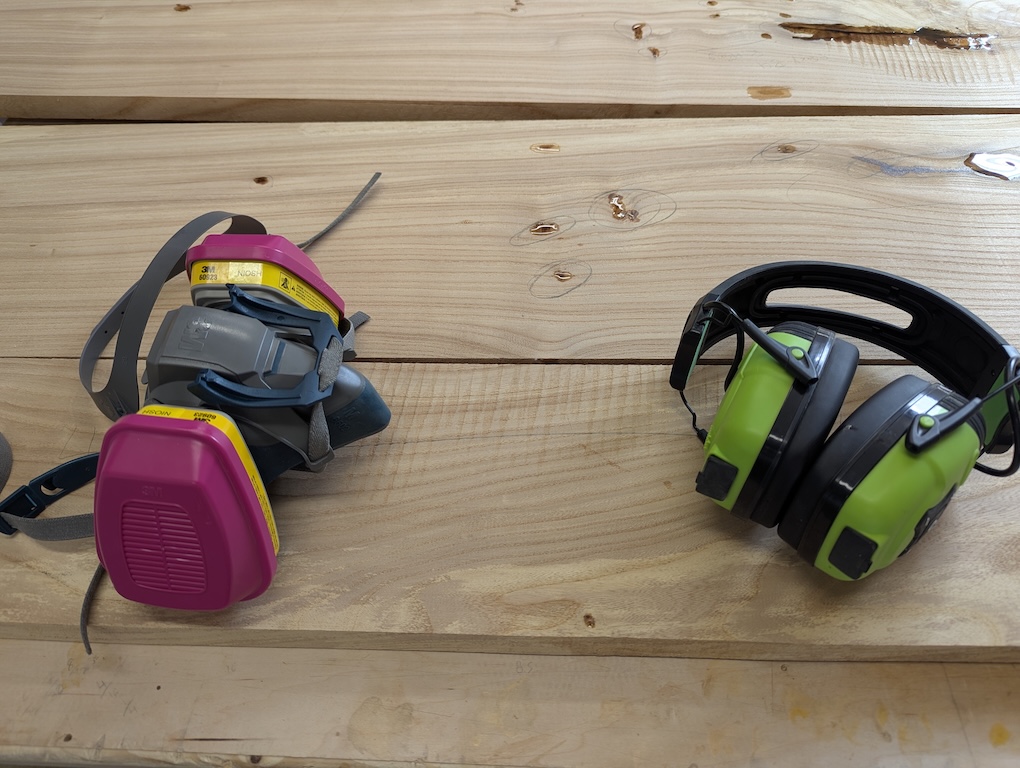
<p>The wood came from <a href="https://urbanforestmill.com/">Urban Forest Mill</a>, a local mill that gets wood from trees in the Front Range. If you’re in the Longmont area, I suggest you check them out! My wife helped me pick out these nicely featured Siberian Elm boards they had there. Unfortunately this is the only photo I have of the raw wood, but you can still see the beautiful grain pattern and some of the epoxy I applied to fill knot holes.</p>

<p><img src="/blog/assets/images/posts/i-made-this-bench-i'm-proud-of-it/raw-wood.jpg" alt="Raw wood boards" class="img-responsive" /></p>

<p>After trying to fill little knot holes in my last project with extra finish and seeing that it didn’t work, I decided to bite the bullet and use epoxy to fill in any holes that I found. It was my first time using epoxy for this and I didn’t realize how many little holes wood normally has. Luckily I didn’t need this piece by a specific date, so I could do multiple passes of epoxy and let it cure fully before sanding it down.</p>

<p>For the finish, I went with Osmo hard wax oil (which was another first for me) and it was very nice to use! Two coats and I was done! Much easier to apply and use than the thinned out poly that I used for my previous projects.</p>

<p><img src="/blog/assets/images/posts/i-made-this-bench-i'm-proud-of-it/glamour-shot.jpg" alt="Final glamour shot" class="img-responsive" /></p>

<p>All in all it was a good project and I’m stoked to use the things I learned here on future furniture.</p>]]></content><author><name>https://dandobrick.com/</name></author><category term="woodworking" /><category term="diy" /><category term="craftsmanship" /><summary type="html"><![CDATA[I built a bench, and I’m proud of it! I modified a design that I had previously used for a coffee table and got the wood from a local lumbermill in my town. Check it out!]]></summary></entry><entry><title type="html">Postgres Lock Queues, Migrations, and Timeouts</title><link href="http://dandobrick.com/blog/posts/postgres-locks-migration-and-timeouts/" rel="alternate" type="text/html" title="Postgres Lock Queues, Migrations, and Timeouts" /><published>2024-04-19T00:00:00+00:00</published><updated>2024-04-19T00:00:00+00:00</updated><id>http://dandobrick.com/blog/posts/postgres-locks-migration-and-timeouts</id><content type="html" xml:base="http://dandobrick.com/blog/posts/postgres-locks-migration-and-timeouts/"><![CDATA[<h2 id="postgres-lock-queues-migrations-and-timeouts">Postgres Lock Queues, Migrations, and Timeouts</h2>

<p>Imagine you are adding a new column to a table that sees a decent amount of traffic. For this example, let’s say we’re adding an <code class="language-plaintext highlighter-rouge">age</code> column to the <code class="language-plaintext highlighter-rouge">users</code> table:</p>

<div class="language-sql highlighter-rouge"><div class="highlight"><pre class="highlight"><code><span class="k">ALTER</span> <span class="k">TABLE</span> <span class="n">users</span> <span class="k">ADD</span> <span class="k">COLUMN</span> <span class="n">age</span> <span class="nb">integer</span><span class="p">;</span>
</code></pre></div></div>

<p>We’re not setting a default value or adding a not null constraint so this should be a super fast migration, we check locally and…</p>

<div class="language-sql highlighter-rouge"><div class="highlight"><pre class="highlight"><code><span class="o">&gt;</span> <span class="k">ALTER</span> <span class="k">TABLE</span> <span class="n">users</span> <span class="k">ADD</span> <span class="k">COLUMN</span> <span class="n">age</span> <span class="nb">integer</span><span class="p">;</span>
<span class="k">ALTER</span> <span class="k">TABLE</span>
<span class="nb">Time</span><span class="p">:</span> <span class="mi">9</span><span class="p">.</span><span class="mi">956</span> <span class="n">ms</span>
</code></pre></div></div>

<p>Lo-and-behold it finishes just as fast as we expected! We run the migration locally, in non-prod environments, everywhere — it’s blazing fast and we’ve done our due diligence. We ship the migration to production, run it, and… the app explodes as the users table grinds to a halt and stops responding to query requests entirely. What just happened?!</p>

<p>NOTE: this scenario is something I encountered in real-life, not just an example to talk about lock queues 😄</p>

<h2 id="postgres-lock-modes">Postgres Lock Modes</h2>

<p>All queries in postgres acquire <em>some</em> kind of lock and, to quote <a href="https://www.postgresql.org/docs/current/explicit-locking.html">the docs</a>:</p>

<blockquote>
  <p>…PostgreSQL commands automatically acquire locks of appropriate modes to ensure that referenced tables are not dropped or modified in incompatible ways while the command executes</p>
</blockquote>

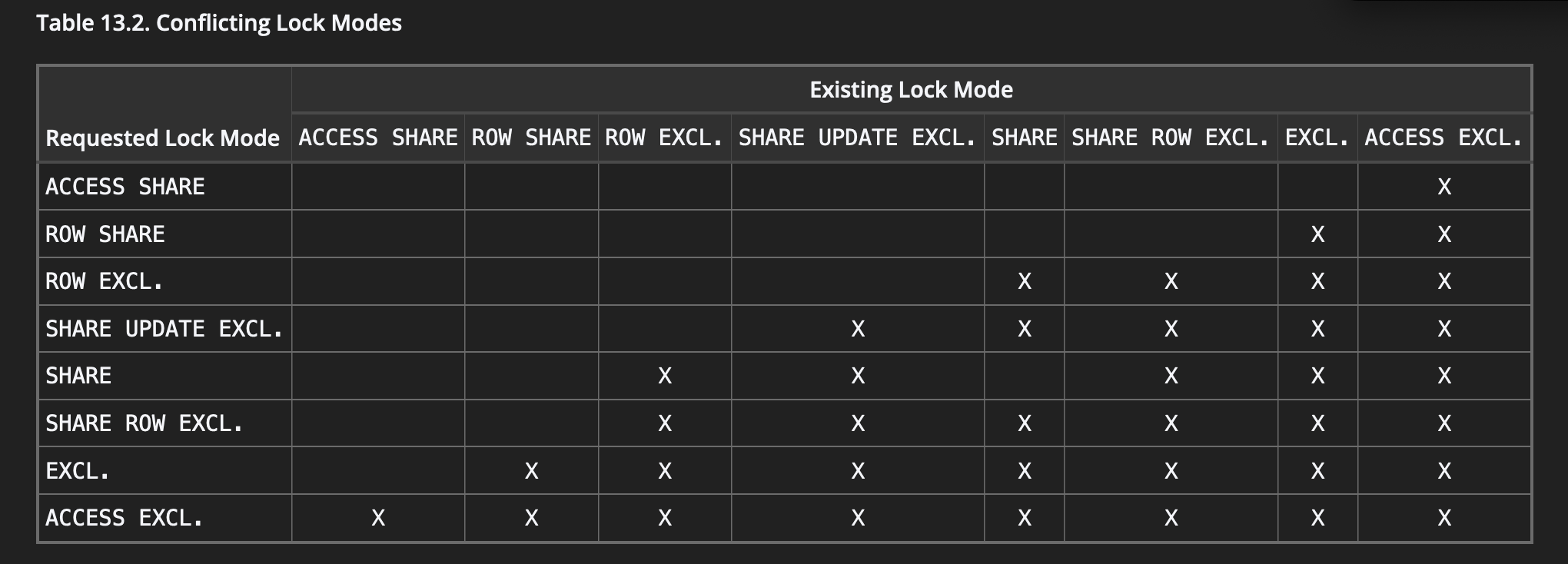
<p>But not all locks in postgres are created equal, some lock rows, others tables and many locks allow other commands to still access data while the operation holds the lock. The table below shows which locks modes conflict with each other (<code class="language-plaintext highlighter-rouge">X</code>’s mean the modes conflict)</p>

<p><img src="/blog/assets/images//posts/postgres-locks-migration-and-timeouts/table-locks.png" alt="Table Locks" class="img-responsive" /></p>

<p style="text-align: center;">Table taken from <a href="https://www.postgresql.org/docs/current/explicit-locking.html#LOCKING-TABLES">the docs on table-level locks</a></p>

<p>This is why we can perform thousands of reads against a single row without a problem; reads require locks such as <code class="language-plaintext highlighter-rouge">ROW EXCLUSIVE</code> which do not conflict with each other.</p>

<p>The problem arises when we are executing statements that require <em>stricter</em> locks, such as most DDL statements which require <code class="language-plaintext highlighter-rouge">ACCESS EXCLUSIVE</code> locks. The <code class="language-plaintext highlighter-rouge">ALTER TABLE</code> from our example above requires such a lock; checking the table above, we see that <code class="language-plaintext highlighter-rouge">ACCESS EXCLUSIVE</code> is the <em>strictest</em> lock level, not permitting any other lock type concurrently.</p>

<h2 id="lock-queue">Lock Queue</h2>
<p>So what happens when two statements try to access the same table, but have conflicting locks?</p>

<p>Again <a href="https://www.postgresql.org/docs/16/functions-info.html">quoting the PG docs</a></p>
<blockquote>
  <p>One server process blocks another if it either holds a lock that conflicts with the blocked process’s lock request (hard block), or is waiting for a lock that would conflict with the blocked process’s lock request and is ahead of it in the wait queue (soft block)</p>
</blockquote>

<p>So when there are multiple queries with conflicting locks such as our example above, postgres puts these commands in a queue, waiting for the blocking queries to finish before allowing the next command to execute.</p>

<h3 id="example">Example</h3>
<p>Let’s simulate a long-running query that has an <code class="language-plaintext highlighter-rouge">ACCESS EXCLUSIVE</code> lock by opening a transaction, obtaining the lock and never closing it</p>

<div class="language-sql highlighter-rouge"><div class="highlight"><pre class="highlight"><code><span class="o">&gt;</span> <span class="k">BEGIN</span><span class="p">;</span>
<span class="k">BEGIN</span>
<span class="o">&gt;</span> <span class="k">LOCK</span> <span class="k">TABLE</span> <span class="n">users</span> <span class="k">IN</span> <span class="k">ACCESS</span> <span class="k">EXCLUSIVE</span> <span class="k">MODE</span><span class="p">;</span>
<span class="k">LOCK</span> <span class="k">TABLE</span>
<span class="c1">-- don't commit this transaction</span>
</code></pre></div></div>

<p>in another transaction we try doing a simple query</p>

<div class="language-sql highlighter-rouge"><div class="highlight"><pre class="highlight"><code><span class="k">SELECT</span> <span class="o">*</span> <span class="k">FROM</span> <span class="n">users</span> <span class="k">LIMIT</span> <span class="mi">1</span><span class="p">;</span>
</code></pre></div></div>

<p>This query <em>hangs</em> since our first transaction still has the <code class="language-plaintext highlighter-rouge">ACCESS EXCLUSIVE</code> lock on the <code class="language-plaintext highlighter-rouge">users</code> table and this query is requesting a conflicting <code class="language-plaintext highlighter-rouge">ACCESS EXCLUSIVE</code> lock. This <code class="language-plaintext highlighter-rouge">SELECT</code> command sits in the lock queue until the original query finishes. Committing the original transaction will release the lock and allow the <code class="language-plaintext highlighter-rouge">SELECT</code> to return since there are no other commands in the queue.</p>

<h2 id="multiple-locks-in-the-queue-the-crux">Multiple Locks in The Queue (The Crux)</h2>
<p>Going back to the original story, we run a query that requires a <em>strict</em> <code class="language-plaintext highlighter-rouge">ACCESS EXCLUSIVE</code> lock (which will prevent other queries from completing on that table), but we know this query should be <em>fast</em>, releasing the lock after 9ms… so why did it grind the table to a halt?</p>

<p>If there is a conflicting lock on a table or row, then commands get put into a queue. If there is another command that wants access to that table/row <em>and there is an existing queue</em>, then all subsequent commands get added to that queue, <em>even if these commands do not conflict with the existing locks!</em>.</p>

<p>This may be easiest to demonstrate via an example</p>

<h3 id="example-1">Example</h3>
<p>To simulate a long-running query, we open a transaction, locking the users table in share mode</p>

<div class="language-sql highlighter-rouge"><div class="highlight"><pre class="highlight"><code><span class="o">&gt;</span> <span class="k">BEGIN</span><span class="p">;</span>
<span class="k">BEGIN</span>
<span class="o">&gt;</span> <span class="k">LOCK</span> <span class="k">TABLE</span> <span class="n">users</span> <span class="k">IN</span> <span class="k">ACCESS</span> <span class="k">SHARE</span> <span class="k">MODE</span><span class="p">;</span>
<span class="k">LOCK</span> <span class="k">TABLE</span>
<span class="c1">-- don't commit this transaction</span>
</code></pre></div></div>
<p>Now our table is locked using <code class="language-plaintext highlighter-rouge">ACCESS SHARE</code> so commands that request a non-conflicting lock will execute without a problem</p>

<div class="language-sql highlighter-rouge"><div class="highlight"><pre class="highlight"><code><span class="k">SELECT</span> <span class="o">*</span> <span class="k">FROM</span> <span class="n">users</span> <span class="k">LIMIT</span> <span class="mi">1</span>
<span class="c1">-- a non-conflicting ACCESS SHARE lock, so it returns a user</span>
</code></pre></div></div>
<p>but if we try to execute a command that requests a conflicting lock (such as <code class="language-plaintext highlighter-rouge">ACCESS EXCLUSIVE</code>), that command will hang, waiting in the queue until the conflicting lock is resolved.</p>

<div class="language-sql highlighter-rouge"><div class="highlight"><pre class="highlight"><code><span class="k">ALTER</span> <span class="k">TABLE</span> <span class="n">users</span> <span class="k">ADD</span> <span class="k">COLUMN</span> <span class="n">age</span> <span class="nb">integer</span><span class="p">;</span>
<span class="c1">-- hangs</span>
</code></pre></div></div>
<p>Hanging, just like we expected!</p>

<p>Now what happens if we try to execute a command that does not conflict with the original lock, another <code class="language-plaintext highlighter-rouge">ACCESS SHARE</code>, let’s use the same <code class="language-plaintext highlighter-rouge">SELECT</code> we saw succeed earlier:</p>

<div class="language-sql highlighter-rouge"><div class="highlight"><pre class="highlight"><code><span class="k">SELECT</span> <span class="o">*</span> <span class="k">FROM</span> <span class="n">users</span> <span class="k">LIMIT</span> <span class="mi">1</span>
<span class="c1">-- hangs</span>
</code></pre></div></div>
<p>This <em>hangs</em>, even though the <code class="language-plaintext highlighter-rouge">ACCESS SHARE</code> lock doesn’t conflict with the table lock. This is because there is already a lock queue so our command needs to wait for the operations <em>ahead of it</em> in the lock queue to finish before it’s allowed to access the data.</p>

<p>If we commit the original transaction, the lock releases, and the commands in the queue are able to process.</p>

<h2 id="so-what-can-you-do">So, What Can You Do?</h2>

<h3 id="handle-long-running-queries">Handle Long-Running Queries</h3>
<p>The obvious answer may be “don’t have long-running queries”, but we all know that isn’t always possible in real life. Another option is to move these long-running queries (and maybe any other reads) to a read-replica to prevent holding conflicting locks for a long period of time, but that can be expensive. While we did eventually do that at my work, there’s a quick-fix that we implemented first.</p>

<h3 id="timeouts">Timeouts</h3>

<p>Postgres gives us the option to configure a couple timeouts, canceling any command that takes longer than the configured value. The first is <a href="https://www.postgresql.org/docs/current/runtime-config-client.html#GUC-STATEMENT-TIMEOUT">statement_timeout</a> and the second is <a href="https://www.postgresql.org/docs/current/runtime-config-client.html#GUC-LOCK-TIMEOUT">lock_timeout</a>.</p>

<p>Setting the <code class="language-plaintext highlighter-rouge">statement_timeout</code> can be handled at the application, load balancer or at the individual command level and will kill any queries that take longer than the timeout. <code class="language-plaintext highlighter-rouge">statement_timeout</code> starts the clock when the command reaches the database so it <em>will</em> take lock queue time into account and would have prevented the issue we saw above. In general a well-tuned <code class="language-plaintext highlighter-rouge">statement_timeout</code> can help prevent rogue queries from stalling your database.</p>

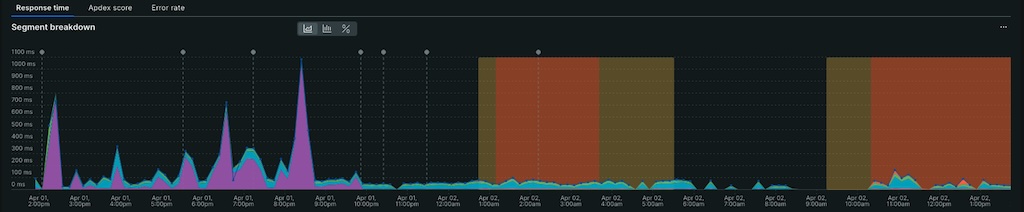
<p>If you want to allow long-running queries, but want prevent long waits for a lock, you can reach for <code class="language-plaintext highlighter-rouge">lock_timeout</code>, it works in a similar way to <code class="language-plaintext highlighter-rouge">statement_timeout</code> but only measures how long the command waits for lock acquisition.</p>]]></content><author><name>https://dandobrick.com/</name></author><category term="postgres" /><summary type="html"><![CDATA[When Postgres operations obtain table-level locks, subsequent operations wait in a queue, but if there are any lock contentions in that queue, long-running queries have the potential to back everything up and can sometimes take down entire applications!]]></summary></entry><entry><title type="html">ActiveRecord `take` vs `first`</title><link href="http://dandobrick.com/blog/posts/ruby's-take-vs-first/" rel="alternate" type="text/html" title="ActiveRecord `take` vs `first`" /><published>2024-04-08T00:00:00+00:00</published><updated>2024-04-08T00:00:00+00:00</updated><id>http://dandobrick.com/blog/posts/ruby&apos;s-take-vs-first</id><content type="html" xml:base="http://dandobrick.com/blog/posts/ruby&apos;s-take-vs-first/"><![CDATA[<p>ActiveRecord has a method called <code class="language-plaintext highlighter-rouge">take</code> that returns a single record similar to <code class="language-plaintext highlighter-rouge">first</code>, except <code class="language-plaintext highlighter-rouge">take</code> doesn’t order the records before selecting one. This can GREATLY increase performance in some circumstances; the latency graph above shows a real-life example of <code class="language-plaintext highlighter-rouge">take</code> significantly reducing the duration of an api call by changing a single <code class="language-plaintext highlighter-rouge">first</code> to <code class="language-plaintext highlighter-rouge">take</code>.
<!--more--></p>

<h2 id="activerecords-first-method">ActiveRecord’s <code class="language-plaintext highlighter-rouge">first</code> method</h2>
<p>I was working in a controller that had some code similar to the following where we wanted to get a single record that matched a <code class="language-plaintext highlighter-rouge">where</code> clause, then perform a function on that record. It didn’t matter <em>which</em> record we grabbed, only that this record matched our <code class="language-plaintext highlighter-rouge">where</code> clause.</p>

<div class="language-ruby highlighter-rouge"><div class="highlight"><pre class="highlight"><code><span class="n">user</span> <span class="o">=</span> <span class="no">User</span><span class="p">.</span><span class="nf">where</span><span class="p">(</span><span class="ss">last_name: </span><span class="s1">'Dobrick'</span><span class="p">).</span><span class="nf">first</span>
<span class="no">MyService</span><span class="p">.</span><span class="nf">action</span><span class="p">(</span><span class="n">user</span><span class="p">)</span>
</code></pre></div></div>

<p>Unbeknownst to me, ActiveRecord’s <code class="language-plaintext highlighter-rouge">first</code> method appends an <code class="language-plaintext highlighter-rouge">ORDER</code> clause to the sql before adding a <code class="language-plaintext highlighter-rouge">LIMIT 1</code></p>

<div class="language-sql highlighter-rouge"><div class="highlight"><pre class="highlight"><code><span class="k">SELECT</span>  <span class="nv">"users"</span><span class="p">.</span><span class="o">*</span> <span class="k">FROM</span> <span class="nv">"users"</span> <span class="k">WHERE</span> <span class="nv">"users"</span><span class="p">.</span><span class="nv">"last_name"</span> <span class="o">=</span> <span class="s1">'Dobrick'</span> <span class="k">ORDER</span> <span class="k">BY</span> <span class="nv">"users"</span><span class="p">.</span><span class="nv">"id"</span> <span class="k">ASC</span> <span class="k">LIMIT</span> <span class="mi">1</span>
</code></pre></div></div>

<p>This means that your database will first need to find all the rows that match our <code class="language-plaintext highlighter-rouge">where</code> clause, then order them before returning one of the records. Depending on how many records match your <code class="language-plaintext highlighter-rouge">where</code> clause, the <code class="language-plaintext highlighter-rouge">order</code> could take longer than expected, just to return the single record you wanted.</p>

<h2 id="take-to-the-rescue"><code class="language-plaintext highlighter-rouge">take</code> to the rescue</h2>
<p>Luckily, I stumbled upon <a href="https://stackoverflow.com/questions/18496421/take-vs-first-performance-in-ruby-on-rails/18498255#18498255">this StackOverflow</a> answer that mentioned <code class="language-plaintext highlighter-rouge">take</code> as a faster alternative.</p>

<p>The exact same code using <code class="language-plaintext highlighter-rouge">take</code> instead of <code class="language-plaintext highlighter-rouge">first</code>:</p>

<div class="language-ruby highlighter-rouge"><div class="highlight"><pre class="highlight"><code><span class="n">user</span> <span class="o">=</span> <span class="no">User</span><span class="p">.</span><span class="nf">where</span><span class="p">(</span><span class="ss">last_name: </span><span class="s1">'Dobrick'</span><span class="p">).</span><span class="nf">take</span>
<span class="no">MyService</span><span class="p">.</span><span class="nf">action</span><span class="p">(</span><span class="n">user</span><span class="p">)</span>
</code></pre></div></div>

<p>Gives the same query without the <code class="language-plaintext highlighter-rouge">ORDER BY</code> clause:</p>
<div class="language-sql highlighter-rouge"><div class="highlight"><pre class="highlight"><code><span class="k">SELECT</span>  <span class="nv">"users"</span><span class="p">.</span><span class="o">*</span> <span class="k">FROM</span> <span class="nv">"users"</span> <span class="k">WHERE</span> <span class="nv">"users"</span><span class="p">.</span><span class="nv">"last_name"</span> <span class="o">=</span> <span class="s1">'Dobrick'</span> <span class="k">LIMIT</span> <span class="mi">1</span>
</code></pre></div></div>

<p>This means our datbase can stop once it finds a single record and return it to us, rather than spend extra time and cycles ordering a bunch of records we don’t care about.</p>

<p>I’m going to show the header image for this post once more to show how big of an impact a single change had on a production API call; you can see the exact deploy where this change was made reducing the average latency from ~200ms to ~0.02ms.
<img src="/blog/assets/images//posts/ruby's-take-vs-first/new-relic.jpg" alt="Latency Graph" class="img-responsive" /></p>

<h2 id="other-options">Other Options</h2>
<p>As the answer on StackOverflow mentioned, you can use something like <code class="language-plaintext highlighter-rouge">find_by</code> to achieve the same result</p>

<div class="language-ruby highlighter-rouge"><div class="highlight"><pre class="highlight"><code><span class="n">user</span> <span class="o">=</span> <span class="no">User</span><span class="p">.</span><span class="nf">find_by</span><span class="p">(</span><span class="ss">last_name: </span><span class="s1">'Dobrick'</span><span class="p">)</span>
<span class="no">MyService</span><span class="p">.</span><span class="nf">action</span><span class="p">(</span><span class="n">user</span><span class="p">)</span>
</code></pre></div></div>

<p>and while this works in our contrived example here, sometimes that’s not an option in a real-world application, so having <code class="language-plaintext highlighter-rouge">take</code> in your toolbag can be quite handy.</p>]]></content><author><name>https://dandobrick.com/</name></author><category term="ruby" /><category term="postgres" /><category term="rails" /><category term="active-record" /><summary type="html"><![CDATA[ActiveRecord has a method called take that returns a single record similar to first, except take doesn’t order the records before selecting one. This can GREATLY increase performance in some circumstances; the latency graph above shows a real-life example of take significantly reducing the duration of an api call by changing a single first to take.]]></summary></entry><entry><title type="html">Numbered Block Params In Ruby</title><link href="http://dandobrick.com/blog/posts/numbered-block-params-in-ruby/" rel="alternate" type="text/html" title="Numbered Block Params In Ruby" /><published>2024-02-28T00:00:00+00:00</published><updated>2024-02-28T00:00:00+00:00</updated><id>http://dandobrick.com/blog/posts/numbered-block-params-in-ruby</id><content type="html" xml:base="http://dandobrick.com/blog/posts/numbered-block-params-in-ruby/"><![CDATA[<h2 id="numbered-block-params-in-ruby">Numbered Block Params In Ruby</h2>

<p>I came across <a href="https://zverok.space/blog/2023-10-11-syntax-sugar1-numeric-block-args.html">this article</a> the a few months back about a little piece of ruby syntax that has become something I reach for on a regular basis.</p>

<p>Let’s for example say we had an array of students, I’ll represent them here as <code class="language-plaintext highlighter-rouge">OpenStruct</code>s:</p>

<div class="language-ruby highlighter-rouge"><div class="highlight"><pre class="highlight"><code><span class="n">students</span> <span class="o">=</span> <span class="p">[</span>
  <span class="no">OpenStruct</span><span class="p">.</span><span class="nf">new</span><span class="p">(</span><span class="ss">first_name: </span><span class="s1">'Dan'</span><span class="p">,</span> <span class="ss">last_name: </span><span class="s1">'Dobrick'</span><span class="p">,</span> <span class="ss">location: </span><span class="s1">'CO'</span><span class="p">),</span>
  <span class="no">OpenStruct</span><span class="p">.</span><span class="nf">new</span><span class="p">(</span><span class="ss">first_name: </span><span class="s1">'Bryce'</span><span class="p">,</span> <span class="ss">last_name: </span><span class="s1">'Harper'</span><span class="p">,</span> <span class="ss">location: </span><span class="s1">'PA'</span><span class="p">),</span>
  <span class="no">OpenStruct</span><span class="p">.</span><span class="nf">new</span><span class="p">(</span><span class="ss">first_name: </span><span class="s1">'Sean'</span><span class="p">,</span> <span class="ss">last_name: </span><span class="s2">"Villanueva O'Driscoll"</span><span class="p">,</span> <span class="ss">location: </span><span class="s1">'Belgium'</span><span class="p">)</span>
<span class="p">]</span>
</code></pre></div></div>

<p>It’s pretty easy to get data about each object in the array, for example, we could <code class="language-plaintext highlighter-rouge">map</code> across the students and get all their first names:</p>

<div class="language-ruby highlighter-rouge"><div class="highlight"><pre class="highlight"><code><span class="o">&gt;</span> <span class="n">students</span><span class="p">.</span><span class="nf">map</span> <span class="p">{</span> <span class="o">|</span><span class="n">student</span><span class="o">|</span> <span class="n">student</span><span class="p">.</span><span class="nf">first_name</span> <span class="p">}</span>
<span class="o">=&gt;</span> <span class="p">[</span><span class="s2">"Dan"</span><span class="p">,</span> <span class="s2">"Bryce"</span><span class="p">,</span> <span class="s2">"Sean"</span><span class="p">]</span>
</code></pre></div></div>

<p>And since engineers are lazy and Ruby likes giving you a thousand ways of doing the same thing, of course we have a shorthand for this.</p>

<div class="language-ruby highlighter-rouge"><div class="highlight"><pre class="highlight"><code><span class="o">&gt;</span> <span class="n">students</span><span class="p">.</span><span class="nf">map</span><span class="p">(</span><span class="o">&amp;</span><span class="ss">:first_name</span><span class="p">)</span>
<span class="o">=&gt;</span> <span class="p">[</span><span class="s2">"Dan"</span><span class="p">,</span> <span class="s2">"Bryce"</span><span class="p">,</span> <span class="s2">"Sean"</span><span class="p">]</span>
</code></pre></div></div>

<p>Unfortunately, if you want to do anything more complex than calling a method on the object, you still need to use the longer syntax and declare a variable.</p>

<div class="language-ruby highlighter-rouge"><div class="highlight"><pre class="highlight"><code><span class="o">&gt;</span> <span class="n">students</span><span class="p">.</span><span class="nf">map</span> <span class="p">{</span> <span class="o">|</span><span class="n">student</span><span class="o">|</span> <span class="s2">"</span><span class="si">#{</span><span class="n">student</span><span class="p">.</span><span class="nf">first_name</span><span class="si">}</span><span class="s2"> </span><span class="si">#{</span><span class="n">student</span><span class="p">.</span><span class="nf">last_name</span><span class="si">}</span><span class="s2">"</span> <span class="p">}</span>
<span class="o">=&gt;</span> <span class="p">[</span><span class="s2">"Dan Dobrick"</span><span class="p">,</span> <span class="s2">"Bryce Harper"</span><span class="p">,</span> <span class="s2">"Sean Villanueva O'Driscoll"</span><span class="p">]</span>
<span class="o">&gt;</span> <span class="n">students</span><span class="p">.</span><span class="nf">map</span> <span class="p">{</span> <span class="o">|</span><span class="n">student</span><span class="o">|</span> <span class="no">SomeService</span><span class="p">.</span><span class="nf">action</span><span class="p">(</span><span class="n">student</span><span class="p">)</span> <span class="p">}</span>
<span class="o">=&gt;</span> <span class="p">[{</span><span class="ss">:name</span><span class="o">=&gt;</span><span class="s2">"Dan Dobrick"</span><span class="p">,</span> <span class="ss">:location</span><span class="o">=&gt;</span><span class="s2">"CO"</span><span class="p">},</span>
 <span class="p">{</span><span class="ss">:name</span><span class="o">=&gt;</span><span class="s2">"Bryce Harper"</span><span class="p">,</span> <span class="ss">:location</span><span class="o">=&gt;</span><span class="s2">"PA"</span><span class="p">},</span>
 <span class="p">{</span><span class="ss">:name</span><span class="o">=&gt;</span><span class="s2">"Sean Villanueva O'Driscoll"</span><span class="p">,</span> <span class="ss">:location</span><span class="o">=&gt;</span><span class="s2">"Belgium"</span><span class="p">}]</span>
</code></pre></div></div>

<p>This kind gets annoying when you have long variable names. The following is something copied from a production codebase I’ve worked on, but tweaked enough to make it more anonymized (and in fact a bit shorter)</p>

<div class="language-ruby highlighter-rouge"><div class="highlight"><pre class="highlight"><code><span class="n">student_subject_observations</span><span class="p">.</span><span class="nf">map</span> <span class="p">{</span> <span class="o">|</span><span class="n">student_subject_observation</span><span class="o">|</span> <span class="no">SomeService</span><span class="p">.</span><span class="nf">record_observation</span><span class="p">(</span><span class="n">student_subject_observation</span><span class="p">)</span> <span class="p">}</span>
</code></pre></div></div>

<p>If you wanted to keep the variable names for whatever reason you would likely refactor this to use the <code class="language-plaintext highlighter-rouge">do/end</code> synax instead</p>

<div class="language-ruby highlighter-rouge"><div class="highlight"><pre class="highlight"><code><span class="n">student_subject_observations</span><span class="p">.</span><span class="nf">map</span> <span class="k">do</span> <span class="o">|</span><span class="n">student_subject_observation</span><span class="o">|</span>
  <span class="no">SomeService</span><span class="p">.</span><span class="nf">record_observation</span><span class="p">(</span><span class="n">student_subject_observation</span><span class="p">)</span>
<span class="k">end</span>
</code></pre></div></div>

<p>While sorta readable, this can be a pain to type out (and like I said above, engineers are a lazy bunch) so maybe you’d use abbreviations</p>

<div class="language-ruby highlighter-rouge"><div class="highlight"><pre class="highlight"><code><span class="n">student_subject_observations</span><span class="p">.</span><span class="nf">map</span> <span class="p">{</span> <span class="o">|</span><span class="n">sso</span><span class="o">|</span> <span class="no">SomeService</span><span class="p">.</span><span class="nf">record_observation</span><span class="p">(</span><span class="n">sso</span><span class="p">)</span> <span class="p">}</span>
</code></pre></div></div>

<p>but if you start using short variable names everywhere, things may get a bit confusing.</p>

<p>Luckily Ruby 2.7 gives us yet ANOTHER way of declaring the iterator variable within a block that removes the need to think of a variable name or type as much: <a href="https://rubyreferences.github.io/rubychanges/2.7.html#numbered-block-parameters">Numbered block parameters</a>.</p>

<p>We can refactor the long string of <code class="language-plaintext highlighter-rouge">student_observation_milestone</code> above into something a bit shorter:</p>

<div class="language-ruby highlighter-rouge"><div class="highlight"><pre class="highlight"><code><span class="n">student_observation_milestones</span><span class="p">.</span><span class="nf">map</span> <span class="p">{</span> <span class="no">SomeService</span><span class="p">.</span><span class="nf">record_observation</span><span class="p">(</span><span class="n">_1</span><span class="p">)</span> <span class="p">}</span>
</code></pre></div></div>

<p>where the <code class="language-plaintext highlighter-rouge">_1</code> references the first param that was passed into <code class="language-plaintext highlighter-rouge">map</code> and the subsequent numbers(<code class="language-plaintext highlighter-rouge">_2</code>, <code class="language-plaintext highlighter-rouge">_3</code>, etc) correspond to the 2nd, 3rd, etc params. This means you don’t have to use <code class="language-plaintext highlighter-rouge">_</code> for unused params:</p>

<div class="language-ruby highlighter-rouge"><div class="highlight"><pre class="highlight"><code><span class="o">&gt;</span> <span class="n">double_array</span> <span class="o">=</span> <span class="p">[[</span><span class="s1">'first item'</span><span class="p">,</span> <span class="s1">'second item'</span><span class="p">],</span> <span class="p">[</span><span class="s1">'1st item'</span><span class="p">,</span> <span class="s1">'2nd item'</span><span class="p">]]</span>
<span class="o">=&gt;</span> <span class="p">[[</span><span class="s2">"first item"</span><span class="p">,</span> <span class="s2">"second item"</span><span class="p">],</span> <span class="p">[</span><span class="s2">"1st item"</span><span class="p">,</span> <span class="s2">"2nd item"</span><span class="p">]]</span>
<span class="o">&gt;</span> <span class="n">double_array</span><span class="p">.</span><span class="nf">map</span> <span class="p">{</span> <span class="o">|</span><span class="n">_</span><span class="p">,</span> <span class="n">second</span><span class="o">|</span> <span class="s2">"The item is: </span><span class="si">#{</span><span class="n">second</span><span class="si">}</span><span class="s2">"</span> <span class="p">}</span>
<span class="o">=&gt;</span> <span class="p">[</span><span class="s2">"The item is: second item"</span><span class="p">,</span> <span class="s2">"The item is: 2nd item"</span><span class="p">]</span>
<span class="o">&gt;</span> <span class="n">double_array</span><span class="p">.</span><span class="nf">map</span> <span class="p">{</span> <span class="s2">"The item is: </span><span class="si">#{</span><span class="n">_2</span><span class="si">}</span><span class="s2">"</span> <span class="p">}</span>
<span class="o">=&gt;</span> <span class="p">[</span><span class="s2">"The item is: second item"</span><span class="p">,</span> <span class="s2">"The item is: 2nd item"</span><span class="p">]</span>
</code></pre></div></div>

<p>And a contrived example of an even larger numbered param:</p>

<div class="language-ruby highlighter-rouge"><div class="highlight"><pre class="highlight"><code><span class="o">&gt;</span> <span class="n">other_double_array</span> <span class="o">=</span> <span class="p">[[</span><span class="mi">0</span><span class="p">,</span> <span class="mi">1</span><span class="p">,</span> <span class="mi">2</span><span class="p">,</span> <span class="mi">4</span><span class="p">,</span> <span class="mi">5</span><span class="p">,</span> <span class="mi">6</span><span class="p">,</span> <span class="mi">7</span><span class="p">],</span> <span class="p">[</span><span class="s1">'a'</span><span class="p">,</span> <span class="s1">'b'</span><span class="p">,</span> <span class="s1">'c'</span><span class="p">,</span> <span class="s1">'d'</span><span class="p">,</span> <span class="s1">'e'</span><span class="p">,</span> <span class="s1">'f'</span><span class="p">]]</span>
<span class="o">=&gt;</span> <span class="p">[[</span><span class="mi">0</span><span class="p">,</span> <span class="mi">1</span><span class="p">,</span> <span class="mi">2</span><span class="p">,</span> <span class="mi">4</span><span class="p">,</span> <span class="mi">5</span><span class="p">,</span> <span class="mi">6</span><span class="p">,</span> <span class="mi">7</span><span class="p">],</span> <span class="p">[</span><span class="s2">"a"</span><span class="p">,</span> <span class="s2">"b"</span><span class="p">,</span> <span class="s2">"c"</span><span class="p">,</span> <span class="s2">"d"</span><span class="p">,</span> <span class="s2">"e"</span><span class="p">,</span> <span class="s2">"f"</span><span class="p">]]</span>
<span class="o">&gt;</span> <span class="n">other_double_array</span><span class="p">.</span><span class="nf">map</span> <span class="p">{</span> <span class="n">_5</span> <span class="p">}</span>
<span class="o">=&gt;</span> <span class="p">[</span><span class="mi">5</span><span class="p">,</span> <span class="s2">"e"</span><span class="p">]</span>
</code></pre></div></div>

<p>This has come in <em>super</em> handy when debugging. No longer do I need to use <code class="language-plaintext highlighter-rouge">a</code> as my variable name when looking for a value:</p>
<div class="language-ruby highlighter-rouge"><div class="highlight"><pre class="highlight"><code><span class="n">foo</span><span class="p">.</span><span class="nf">map</span> <span class="p">{</span> <span class="o">|</span><span class="n">a</span><span class="o">|</span> <span class="n">a</span><span class="p">.</span><span class="nf">first_name</span> <span class="o">==</span> <span class="s2">"Homer"</span> <span class="p">}</span>
<span class="c1"># Becomes</span>
<span class="n">foo</span><span class="p">.</span><span class="nf">map</span> <span class="p">{</span> <span class="n">_1</span><span class="p">.</span><span class="nf">first_name</span> <span class="o">==</span> <span class="s2">"Homer"</span> <span class="p">}</span>
</code></pre></div></div>

<p>and my workplace has actually started to adopt this syntax in our codebases for short blocks where explicit variable names aren’t adding to the understanding of the code.</p>]]></content><author><name>https://dandobrick.com/</name></author><category term="ruby" /><summary type="html"><![CDATA[Ruby 2.7 added some syntax sugar that has been making my life easier at work; no longer do I need to use `a` as my "placeholder" variable in enumerators, instead, we have a built in "numbered" block parameter!]]></summary></entry><entry><title type="html">Postgres Enums: Don’t Use ‘Em</title><link href="http://dandobrick.com/blog/posts/postgres-enums-don't-use-'em/" rel="alternate" type="text/html" title="Postgres Enums: Don’t Use ‘Em" /><published>2022-04-22T00:00:00+00:00</published><updated>2022-04-22T00:00:00+00:00</updated><id>http://dandobrick.com/blog/posts/postgres-enums:-don&apos;t-use-&apos;em</id><content type="html" xml:base="http://dandobrick.com/blog/posts/postgres-enums-don&apos;t-use-&apos;em/"><![CDATA[<p>When designing a table with a column that will only select from a limited number of options, you’ll want to ensure that the values in your database match whatever options you lay out. For example, we could have a table of subscriptions that have either a <code class="language-plaintext highlighter-rouge">monthly</code> or <code class="language-plaintext highlighter-rouge">annual</code> recurrence interval:</p>

<div class="language-sql highlighter-rouge"><div class="highlight"><pre class="highlight"><code><span class="k">CREATE</span> <span class="k">TABLE</span> <span class="n">subscriptions</span><span class="p">(</span>
  <span class="n">id</span> <span class="n">uuid</span> <span class="k">PRIMARY</span> <span class="k">KEY</span> <span class="k">DEFAULT</span> <span class="n">uuid_generate_v4</span><span class="p">(),</span>
  <span class="n">cost_cents</span> <span class="nb">INTEGER</span> <span class="k">CHECK</span><span class="p">(</span><span class="n">cost_cents</span> <span class="o">&gt;</span> <span class="mi">0</span><span class="p">),</span>
  <span class="n">recurrence_interval</span> <span class="nb">VARCHAR</span> <span class="c1">-- Need to ensure the values of this column are consistent</span>
<span class="p">);</span>
</code></pre></div></div>

<p>There are a few options for doing this in postgres, but I’m only going to discuss to here, one I recommend (a new table) and one I do not (using <code class="language-plaintext highlighter-rouge">ENUM</code>s)</p>

<h2 id="postgres-enum-type">Postgres Enum Type</h2>
<p>Postgres gives you fairly easy to create and access ENUMs:</p>

<div class="language-sql highlighter-rouge"><div class="highlight"><pre class="highlight"><code><span class="k">CREATE</span> <span class="k">TYPE</span> <span class="n">INTERVAL_OPTIONS</span> <span class="k">as</span> <span class="nb">ENUM</span> <span class="p">(</span><span class="s1">'monthly'</span><span class="p">,</span> <span class="s1">'annual'</span><span class="p">);</span>

<span class="k">CREATE</span> <span class="k">TABLE</span> <span class="n">subscriptions</span><span class="p">(</span>
  <span class="n">id</span> <span class="n">uuid</span> <span class="k">PRIMARY</span> <span class="k">KEY</span> <span class="k">DEFAULT</span> <span class="n">uuid_generate_v4</span><span class="p">(),</span>
  <span class="n">cost_cents</span> <span class="nb">INTEGER</span> <span class="k">CHECK</span><span class="p">(</span><span class="n">cost_cents</span> <span class="o">&gt;</span> <span class="mi">0</span><span class="p">),</span>
  <span class="n">recurrence_interval</span> <span class="n">INTERVAL_OPTIONS</span>
<span class="p">);</span>
</code></pre></div></div>

<p>Postgres will check the values you insert to ensure they’re included in the enum and raise an error if they’re not valid:</p>

<div class="language-sql highlighter-rouge"><div class="highlight"><pre class="highlight"><code><span class="k">INSERT</span> <span class="k">INTO</span> <span class="n">subscriptions</span> <span class="p">(</span><span class="n">cost_cents</span><span class="p">,</span> <span class="n">recurrence_interval</span><span class="p">)</span>
<span class="k">VALUES</span><span class="p">(</span><span class="mi">100</span><span class="p">,</span> <span class="s1">'not-enumerated'</span><span class="p">);</span>
<span class="c1">-- ERROR:  invalid input value for enum interval_options: "not-enumerated"</span>
<span class="c1">-- LINE 2: VALUES(100, 'not-enumerated');</span>
</code></pre></div></div>

<p>While it’s easy to insert <a href="https://www.postgresql.org/docs/current/sql-altertype.html">new values into the enum</a> (after postgres 9.1)</p>

<div class="language-sql highlighter-rouge"><div class="highlight"><pre class="highlight"><code><span class="k">ALTER</span> <span class="k">TYPE</span> <span class="n">INTERVAL_OPTIONS</span> <span class="k">ADD</span> <span class="n">VALUE</span> <span class="s1">'bi-annual'</span><span class="p">;</span> <span class="c1">-- appends to list</span>
</code></pre></div></div>
<p>Dropping a value is <a href="https://www.postgresql.org/docs/current/datatype-enum.html">not supported</a>!</p>

<blockquote>
  <p>Although enum types are primarily intended for static sets of values, there is support for adding new values to an existing enum type, and for renaming values (see <a href="https://www.postgresql.org/docs/current/sql-altertype.html">ALTER TYPE</a>). Existing values cannot be removed from an enum type, nor can the sort ordering of such values be changed, short of dropping and re-creating the enum type.</p>
</blockquote>

<p>As for why, Tom Lane (a member of the core postgres development team) states the following <a href="https://www.postgresql.org/message-id/835.1527628154%40sss.pgh.pa.us">a mailing list post from 2018</a></p>

<blockquote>
  <p>The key problem that is hard to fix here is that, even if today you have
no live rows containing that value, it may still be present in indexes.
In a btree, for example, the value might’ve migrated up into upper index
pages as a page boundary value.  Once that’s happened, it’s likely to
persist indefinitely, even if the live occurrences in the underlying table
get deleted and vacuumed away.</p>
</blockquote>

<p>It’s the lack of removing elements from the Enum that makes them a <em>bad</em> candidate for most use-cases; unless you KNOW FOR CERTAIN that you’ll never need to <em>remove</em> an element from the enum, I suggest creating a new table and using foreign key relationships to accomplish a similar goal.</p>

<h2 id="new-table-and-foreign-keys">New Table and Foreign Keys</h2>
<p>Creating a table to store the values and referencing them is a <em>very</em> similar process to creating the <code class="language-plaintext highlighter-rouge">ENUM</code>.</p>

<div class="language-sql highlighter-rouge"><div class="highlight"><pre class="highlight"><code><span class="k">CREATE</span> <span class="k">table</span> <span class="n">recurrence_intervals</span><span class="p">(</span>
  <span class="n">id</span> <span class="nb">VARCHAR</span> <span class="k">PRIMARY</span> <span class="k">KEY</span>
<span class="p">);</span>

<span class="k">CREATE</span> <span class="k">TABLE</span> <span class="n">subscriptions</span><span class="p">(</span>
  <span class="n">id</span> <span class="n">uuid</span> <span class="k">PRIMARY</span> <span class="k">KEY</span> <span class="k">DEFAULT</span> <span class="n">uuid_generate_v4</span><span class="p">(),</span>
  <span class="n">cost_cents</span> <span class="nb">INTEGER</span> <span class="k">CHECK</span><span class="p">(</span><span class="n">cost_cents</span> <span class="o">&gt;</span> <span class="mi">0</span><span class="p">),</span>
  <span class="n">recurrence_interval</span> <span class="nb">VARCHAR</span><span class="p">,</span>
  <span class="k">CONSTRAINT</span> <span class="n">fk_recurrence_interval</span>
    <span class="k">FOREIGN</span> <span class="k">KEY</span><span class="p">(</span><span class="n">recurrence_interval</span><span class="p">)</span> 
      <span class="k">REFERENCES</span> <span class="n">recurrence_intervals</span><span class="p">(</span><span class="n">id</span><span class="p">)</span>
<span class="p">);</span>
</code></pre></div></div>
<p>Then adding new values is a simple INSERT into the DB</p>

<div class="language-sql highlighter-rouge"><div class="highlight"><pre class="highlight"><code><span class="k">INSERT</span> <span class="k">INTO</span> <span class="n">recurrence_intervals</span><span class="p">(</span><span class="n">id</span><span class="p">)</span> <span class="n">value</span> <span class="p">(</span><span class="s1">'bi-annual'</span><span class="p">)</span>
</code></pre></div></div>

<p>and you still have referential integrity</p>

<div class="language-sql highlighter-rouge"><div class="highlight"><pre class="highlight"><code><span class="k">INSERT</span> <span class="k">INTO</span> <span class="n">subscriptions</span> <span class="p">(</span><span class="n">cost_cents</span><span class="p">,</span> <span class="n">recurrence_interval</span><span class="p">)</span>
<span class="k">VALUES</span><span class="p">(</span><span class="mi">100</span><span class="p">,</span> <span class="s1">'not-enumerated'</span><span class="p">);</span>
<span class="c1">-- ERROR:  insert or update on table "subscriptions" violates foreign key constraint "fk_recurrence_interval"</span>
<span class="c1">-- DETAIL:  Key (recurrence_interval)=(not-enumerated) is not present in table "recurrence_intervals".</span>
</code></pre></div></div>

<p>And while <a href="https://www.brianlikespostgres.com/cost-of-a-join.html">JOINS are VERY cheap</a>, if we use descriptive strings for the primary keys we don’t have to do any JOINS to get the data we want.</p>

<div class="language-sql highlighter-rouge"><div class="highlight"><pre class="highlight"><code><span class="k">SELECT</span> <span class="o">*</span> <span class="k">from</span> <span class="n">subscriptions</span> <span class="k">LIMIT</span> <span class="mi">1</span>
<span class="c1">--                   id                  | cost_cents | recurrence_interval </span>
<span class="c1">--------------------------------------+------------+---------------------</span>
 <span class="c1">-- 855418d0-ae44-4e44-ba7c-dab24370dc1e |        100 | monthly</span>
</code></pre></div></div>

<p>Finally, you can <em>remove</em> a value from the table by ensuring there are no references then simply dropping the value:</p>

<div class="language-sql highlighter-rouge"><div class="highlight"><pre class="highlight"><code><span class="k">DELETE</span> <span class="k">FROM</span> <span class="n">recurrence_intervals</span> <span class="k">where</span> <span class="n">id</span><span class="o">=</span><span class="s1">'monthly'</span>
</code></pre></div></div>
<p>While this is TECHINICALLY possible with ENUMs, the quote from Tom Lane above explains why it’s a bad idea.</p>

<h2 id="conclusion">Conclusion</h2>
<p>And it’s for all of these reasons that I recommend using a new table and FK relationships over using the native <code class="language-plaintext highlighter-rouge">ENUM</code> functionality of Postgres. There are other solutions out there such as storing a string with a <code class="language-plaintext highlighter-rouge">CHECK</code> constraint or just using in-app validations, but those have the same or <em>more</em> downsides as <code class="language-plaintext highlighter-rouge">ENUM</code>.</p>]]></content><author><name>https://dandobrick.com/</name></author><category term="postgres" /><category term="enums" /><category term="database" /><summary type="html"><![CDATA[While Postgres offers an ENUM type, the general recommendation is NOT to use it, here I discuss why and give an alterative solution that I prefer: creating a new table and referencing foreign keys]]></summary></entry><entry><title type="html">Ambush!</title><link href="http://dandobrick.com/blog/posts/ambush!/" rel="alternate" type="text/html" title="Ambush!" /><published>2022-01-11T00:00:00+00:00</published><updated>2022-01-11T00:00:00+00:00</updated><id>http://dandobrick.com/blog/posts/ambush!</id><content type="html" xml:base="http://dandobrick.com/blog/posts/ambush!/"><![CDATA[<p>Ambush! is a solo WW2 strategy game where you command a squad of US soldiers through 8 different missions which you can link together into a longer campaign. Each mission has different victory conditions and mission-specific rules that change the behavior of the map, limit the equipment you can bring or variations keeping the scenario unique and interesting.</p>

<!--more-->

<h2 id="ambush-video">Ambush! Video</h2>
<div class="videoWrapper">
  <iframe width="100%" height="" src="http://www.youtube.com/embed/OOeb67a7K5g" frameborder="0" allowfullscreen=""></iframe>
</div>]]></content><author><name>https://dandobrick.com/</name></author><category term="boardgames" /><category term="wargame" /><category term="boardgames" /><category term="reviews" /><summary type="html"><![CDATA[Ambush! is a solo WW2 strategy game where you command a squad of US soldiers through 8 different missions which you can link together into a longer campaign. Each mission has different victory conditions and mission-specific rules that change the behavior of the map, limit the equipment you can bring or variations keeping the scenario unique and interesting.]]></summary></entry><entry><title type="html">Using `NOT` in Postgres `CHECK` constraints</title><link href="http://dandobrick.com/blog/posts/using-not-in-postgres-check-constraints/" rel="alternate" type="text/html" title="Using `NOT` in Postgres `CHECK` constraints" /><published>2021-04-16T00:00:00+00:00</published><updated>2021-04-16T00:00:00+00:00</updated><id>http://dandobrick.com/blog/posts/using-not-in-postgres-check-constraints</id><content type="html" xml:base="http://dandobrick.com/blog/posts/using-not-in-postgres-check-constraints/"><![CDATA[<p>For some reason I could not find good information on this (maybe because it’s obvious). But you can add <code class="language-plaintext highlighter-rouge">NOT</code> into your Postgres <code class="language-plaintext highlighter-rouge">CHECK CONSTRAINT</code>s; this is particularly useful when you find a nice succinct way to express the negation of the constraint you want.
<!--more--></p>

<p>Consider the following scenario:</p>

<p>You have a table that contains pricing data and that data has both a frequency (monthly, daily, etc) and a value in cents. That table may look something like:</p>
<div class="language-sql highlighter-rouge"><div class="highlight"><pre class="highlight"><code>
<span class="k">CREATE</span> <span class="k">TABLE</span> <span class="n">pricing_data</span> <span class="p">(</span>
    <span class="n">service_name</span> <span class="nb">character</span> <span class="nb">varying</span><span class="p">,</span>
    <span class="n">pricing_frequency</span> <span class="nb">character</span> <span class="nb">varying</span><span class="p">,</span>
    <span class="n">pricing_value</span> <span class="nb">integer</span>
<span class="p">);</span>

</code></pre></div></div>

<p>When allowing users to edit this information, we don’t want to require that info when creating the record thus adding a <code class="language-plaintext highlighter-rouge">NOT NULL</code> constraint is out of the picture. On the other hand, if a user inputs ONE of the pricing values, you want to be sure that the OTHER value is also present.</p>

<p>A constraint such as this would work</p>
<div class="language-sql highlighter-rouge"><div class="highlight"><pre class="highlight"><code><span class="k">ALTER</span> <span class="k">TABLE</span> <span class="n">pricing_data</span>
<span class="k">ADD</span> <span class="k">CONSTRAINT</span> <span class="n">require_pricing_frequency_and_pricing_value</span> <span class="k">CHECK</span> <span class="p">(</span>
    <span class="p">(</span><span class="n">num_nulls</span><span class="p">(</span><span class="n">pricing_frequncy</span><span class="p">,</span> <span class="n">pricing_value</span><span class="p">)</span> <span class="o">==</span> <span class="mi">0</span><span class="p">)</span>
    <span class="k">OR</span>
    <span class="p">(</span><span class="n">num_nulls</span><span class="p">(</span><span class="n">pricing_frequncy</span><span class="p">,</span> <span class="n">pricing_value</span><span class="p">)</span> <span class="o">==</span> <span class="mi">2</span><span class="p">)</span>
<span class="p">)</span>
</code></pre></div></div>

<p>But that was a bit verbose and I knew there must be a better way; after messing around a bit, I wrote a constraint that validated if both or neither values are <code class="language-plaintext highlighter-rouge">NULL</code>:</p>

<div class="language-sql highlighter-rouge"><div class="highlight"><pre class="highlight"><code><span class="k">ALTER</span> <span class="k">TABLE</span> <span class="n">pricing_data</span>
<span class="k">ADD</span> <span class="k">CONSTRAINT</span> <span class="n">require_pricing_frequency_and_pricing_value</span> <span class="k">CHECK</span> <span class="p">(</span>
    <span class="n">num_nulls</span><span class="p">(</span><span class="n">pricing_frequency</span><span class="p">,</span> <span class="n">pricing_value</span><span class="p">)</span> <span class="o">=</span> <span class="mi">1</span>
<span class="p">)</span>
</code></pre></div></div>

<p>Unfortunately, this is the opposite of what we actually want.</p>

<p>After searching the internet and finding nothing helpful (though I did learn about <a href="https://www.postgresql.org/docs/9.0/sql-createtable.html#SQL-CREATETABLE-EXCLUDE"><code class="language-plaintext highlighter-rouge">EXCLUDE</code> constraints</a>) I tried simply throwing a <code class="language-plaintext highlighter-rouge">NOT</code> in my constraint to see what it would do</p>

<div class="language-sql highlighter-rouge"><div class="highlight"><pre class="highlight"><code><span class="k">ALTER</span> <span class="k">TABLE</span> <span class="n">pricing_data</span>
<span class="k">ADD</span> <span class="k">CONSTRAINT</span> <span class="n">require_pricing_frequency_and_pricing_value</span> <span class="k">CHECK</span> <span class="p">(</span>
    <span class="k">NOT</span> <span class="p">(</span><span class="n">num_nulls</span><span class="p">(</span><span class="n">pricing_frequency</span><span class="p">,</span> <span class="n">pricing_value</span><span class="p">)</span> <span class="o">=</span> <span class="mi">1</span><span class="p">)</span>
<span class="p">)</span>
</code></pre></div></div>

<p>Lo-and-behold, this did what I wanted and I was able to leverage the DB to validate my data! Huzzah!</p>]]></content><author><name>https://dandobrick.com/</name></author><category term="postgres" /><summary type="html"><![CDATA[For some reason I could not find good information on this (maybe because it’s obvious). But you can add NOT into your Postgres CHECK CONSTRAINTs; this is particularly useful when you find a nice succinct way to express the negation of the constraint you want.]]></summary></entry><entry><title type="html">Ruby’s Partition Method: It Does What You Think.</title><link href="http://dandobrick.com/blog/posts/ruby-partitions/" rel="alternate" type="text/html" title="Ruby’s Partition Method: It Does What You Think." /><published>2020-10-03T00:00:00+00:00</published><updated>2020-10-03T00:00:00+00:00</updated><id>http://dandobrick.com/blog/posts/ruby-partitions</id><content type="html" xml:base="http://dandobrick.com/blog/posts/ruby-partitions/"><![CDATA[<p>Ruby has a neat function in <code class="language-plaintext highlighter-rouge">Enumerable</code> called <a href="https://ruby-doc.org/core-2.5.1/Enumerable.html#method-i-partition">partition</a> that can split the values in the enumerable into two partitions based arbitrary logic.
<!--more--></p>

<h2 id="my-problem">My problem</h2>

<p>I had an array of ActiveRecord models:</p>

<div class="language-ruby highlighter-rouge"><div class="highlight"><pre class="highlight"><code><span class="k">class</span> <span class="nc">Section</span> <span class="o">&lt;</span> <span class="no">ActiveRecord</span><span class="o">::</span><span class="no">Base</span>
  <span class="c1"># TABLE public.sections (</span>
  <span class="c1"># id integer NOT NULL,</span>
  <span class="c1"># section_type character varying, NOT NULL,</span>
  <span class="c1"># created_at timestamp without time zone NOT NULL,</span>
  <span class="c1"># updated_at timestamp without time zone NOT NULL</span>
  <span class="c1"># )</span>
  <span class="n">has_many</span> <span class="ss">:fields</span>
<span class="k">end</span>

<span class="k">class</span> <span class="nc">Field</span> <span class="o">&lt;</span> <span class="no">ActiveRecord</span><span class="o">::</span><span class="no">Base</span>
  <span class="c1"># TABLE public.fields (</span>
  <span class="c1"># id integer NOT NULL,</span>
  <span class="c1"># created_at timestamp without time zone NOT NULL,</span>
  <span class="c1"># updated_at timestamp without time zone NOT NULL</span>
  <span class="c1"># )</span>
  <span class="n">belongs_to</span> <span class="ss">:section</span>
<span class="k">end</span>
</code></pre></div></div>

<p>That were being serialized based on a bunch of logic earlier in the application:</p>
<div class="language-ruby highlighter-rouge"><div class="highlight"><pre class="highlight"><code><span class="k">class</span> <span class="nc">SerializerClass</span>
  <span class="kp">module_function</span>

  <span class="k">def</span> <span class="nf">serialize_fields</span><span class="p">(</span><span class="n">fields</span><span class="p">)</span>
    <span class="n">sorted_fields</span> <span class="o">=</span> <span class="n">special_sort</span><span class="p">(</span><span class="n">fields</span><span class="p">)</span>
  <span class="k">end</span>
<span class="k">end</span>
</code></pre></div></div>

<p>I was tasked with placing any fields belonging to sections of type <code class="language-plaintext highlighter-rouge">last</code> at the <em>end</em> of the serialized list regardless of where they were sorted previously. Also, if there were multiple fields related to sections of type <code class="language-plaintext highlighter-rouge">last</code>, I needed to ensure they stayed in the order they were sorted into previously.</p>

<p>This might be better illustrated by a simplified example: say we wanted to place all names starting with the letter <code class="language-plaintext highlighter-rouge">A</code> a the end of this list, ensuring they were in the same order given to us:</p>

<div class="language-ruby highlighter-rouge"><div class="highlight"><pre class="highlight"><code><span class="c1"># Given Input</span>
<span class="p">[</span><span class="s1">'Billy'</span><span class="p">,</span> <span class="s1">'Alex'</span><span class="p">,</span> <span class="s1">'Sanjay'</span><span class="p">,</span> <span class="s1">'Anwar'</span><span class="p">,</span> <span class="s1">'Dan'</span><span class="p">]</span>
<span class="c1"># Desired output:</span>
<span class="p">[</span><span class="s1">'Billy'</span><span class="p">,</span> <span class="s1">'Sanjay'</span><span class="p">,</span> <span class="s1">'Dan'</span><span class="p">,</span> <span class="s1">'Alex'</span><span class="p">,</span> <span class="s1">'Anwar'</span><span class="p">]</span>
</code></pre></div></div>

<p>Unfortunately ruby <code class="language-plaintext highlighter-rouge">delete_if</code> doesn’t return the objects removed, so we need to find them, delete them then put them back on at the end.</p>

<div class="language-ruby highlighter-rouge"><div class="highlight"><pre class="highlight"><code><span class="k">class</span> <span class="nc">SerializerClass</span>
  <span class="kp">module_function</span>

  <span class="k">def</span> <span class="nf">serialize_fields</span><span class="p">(</span><span class="n">fields</span><span class="p">)</span>
    <span class="n">sorted_fields</span> <span class="o">=</span> <span class="n">special_sort</span><span class="p">(</span><span class="n">fields</span><span class="p">)</span>
    <span class="n">last_fields</span> <span class="o">=</span> <span class="n">sorted_fields</span><span class="p">.</span><span class="nf">find_by</span> <span class="p">{</span> <span class="o">|</span><span class="n">field</span><span class="o">|</span> <span class="n">field</span><span class="p">.</span><span class="nf">section</span><span class="p">.</span><span class="nf">section_type</span> <span class="o">==</span> <span class="s1">'last'</span> <span class="p">}</span>

    <span class="c1"># Required because .delete(*[]) returns an ArgumentError:</span>
    <span class="k">if</span> <span class="n">last_fields</span><span class="p">.</span><span class="nf">count</span> <span class="o">&gt;</span> <span class="mi">0</span>
      <span class="n">sorted_fields</span> <span class="o">=</span> <span class="n">sorted_fields</span><span class="p">.</span><span class="nf">delete</span><span class="p">(</span><span class="o">*</span><span class="n">last_fields</span><span class="p">)</span>
      <span class="n">sorted_fields</span> <span class="o">=</span> <span class="n">sorted_fields</span><span class="p">.</span><span class="nf">append</span><span class="p">(</span><span class="o">*</span><span class="n">last_fields</span><span class="p">)</span>
    <span class="k">end</span>
    <span class="n">sorted_fields</span>
  <span class="k">end</span>
<span class="k">end</span>
</code></pre></div></div>

<p>This isn’t <em>great</em>, but it worked until we could get more explicit ordering in the up-stream logic.</p>

<p>A few weeks later I was told we need to add ANOTHER bit of logic putting fields belonging to any <code class="language-plaintext highlighter-rouge">penultimate</code> sections after everything except those <code class="language-plaintext highlighter-rouge">last</code> fields…. Also we didn’t have time to add the logic upstream where it really belonged.</p>

<p>This gets gross kinda quickly:</p>
<div class="language-ruby highlighter-rouge"><div class="highlight"><pre class="highlight"><code><span class="k">class</span> <span class="nc">SerializerClass</span>
  <span class="kp">module_function</span>

  <span class="k">def</span> <span class="nf">serialize_fields</span><span class="p">(</span><span class="n">fields</span><span class="p">)</span>
    <span class="n">sorted_fields</span> <span class="o">=</span> <span class="n">special_sort</span><span class="p">(</span><span class="n">fields</span><span class="p">)</span>
    <span class="n">last_fields</span> <span class="o">=</span> <span class="n">sorted_fields</span><span class="p">.</span><span class="nf">select</span> <span class="p">{</span> <span class="o">|</span><span class="n">field</span><span class="o">|</span> <span class="n">field</span><span class="p">.</span><span class="nf">section</span><span class="p">.</span><span class="nf">section_type</span> <span class="o">==</span> <span class="s1">'last'</span> <span class="p">}</span>
    <span class="n">penultimate_fields</span> <span class="o">=</span> <span class="n">sorted_fields</span><span class="p">.</span><span class="nf">select</span> <span class="p">{</span> <span class="o">|</span><span class="n">field</span><span class="o">|</span> <span class="n">field</span><span class="p">.</span><span class="nf">section</span><span class="p">.</span><span class="nf">section_type</span> <span class="o">==</span> <span class="s1">'penultimate'</span> <span class="p">}</span>

    <span class="k">if</span> <span class="n">last_fields</span><span class="p">.</span><span class="nf">any?</span>
      <span class="n">sorted_fields</span> <span class="o">=</span> <span class="n">sorted_fields</span><span class="p">.</span><span class="nf">delete</span><span class="p">(</span><span class="o">*</span><span class="n">last_fields</span><span class="p">)</span>

      <span class="k">if</span> <span class="n">penultimate_fields</span><span class="p">.</span><span class="nf">any?</span>
        <span class="n">sorted_fields</span> <span class="o">=</span> <span class="n">sorted_fields</span><span class="p">.</span><span class="nf">delete</span><span class="p">(</span><span class="o">*</span><span class="n">penultimate_fields</span><span class="p">)</span>
        <span class="c1"># Writing this now I'm realizing I could have done array addition at the end instead of using</span>
        <span class="c1"># append, but I like my partition solution better anyway </span>
        <span class="n">sorted_fields</span> <span class="o">=</span> <span class="n">sorted_fields</span><span class="p">.</span><span class="nf">append</span><span class="p">(</span><span class="o">*</span><span class="n">penultimate_fields</span><span class="p">)</span>
      <span class="k">end</span>

      <span class="n">sorted_fields</span> <span class="o">=</span> <span class="n">sorted_fields</span><span class="p">.</span><span class="nf">append</span><span class="p">(</span><span class="o">*</span><span class="n">last_fields</span><span class="p">)</span>
    <span class="k">end</span>
    <span class="n">sorted_fields</span>
  <span class="k">end</span>
<span class="k">end</span>
</code></pre></div></div>

<p>So I decided to check if <a href="https://ruby-doc.org/core-2.5.1/Array.html"><code class="language-plaintext highlighter-rouge">Array</code></a> or <a href="https://ruby-doc.org/core-2.5.1/Enumerable.html"><code class="language-plaintext highlighter-rouge">Enumerable</code></a> had methods I could leverage.</p>

<h2 id="my-solution">My Solution</h2>

<p>After reading the docs a bit, I found <a href="https://ruby-doc.org/core-2.5.1/Enumerable.html#method-i-partition">partition</a> which returns an array of arrays, the first containing everything that returned <code class="language-plaintext highlighter-rouge">true</code> and the second array containing everything else:</p>

<div class="language-ruby highlighter-rouge"><div class="highlight"><pre class="highlight"><code><span class="p">[</span><span class="mi">1</span><span class="p">,</span> <span class="mi">2</span><span class="p">,</span> <span class="mi">3</span><span class="p">,</span> <span class="mi">4</span><span class="p">,</span> <span class="mi">5</span><span class="p">,</span> <span class="mi">6</span><span class="p">].</span><span class="nf">partition</span> <span class="p">{</span> <span class="o">|</span><span class="n">num</span><span class="o">|</span> <span class="n">num</span> <span class="o">%</span> <span class="mi">2</span> <span class="o">==</span> <span class="mi">0</span> <span class="p">}</span>
<span class="c1"># =&gt; [[2, 4, 6], [1, 3, 5]]</span>
</code></pre></div></div>

<p>You can also assign multiple variables at the same time like so:</p>
<div class="language-ruby highlighter-rouge"><div class="highlight"><pre class="highlight"><code><span class="n">even</span><span class="p">,</span> <span class="n">odd</span> <span class="o">=</span> <span class="p">[</span><span class="mi">1</span><span class="p">,</span> <span class="mi">2</span><span class="p">,</span> <span class="mi">3</span><span class="p">,</span> <span class="mi">4</span><span class="p">,</span> <span class="mi">5</span><span class="p">,</span> <span class="mi">6</span><span class="p">].</span><span class="nf">partition</span> <span class="p">{</span> <span class="o">|</span><span class="n">num</span><span class="o">|</span> <span class="n">num</span> <span class="o">%</span> <span class="mi">2</span> <span class="o">==</span> <span class="mi">0</span> <span class="p">}</span>

<span class="nb">p</span> <span class="n">even</span>
<span class="c1"># =&gt; [2, 4, 6]</span>
<span class="nb">p</span> <span class="n">odd</span>
<span class="c1"># =&gt; [1, 3, 5]</span>
</code></pre></div></div>

<p>Re-writing the code above with partition we can say:</p>
<div class="language-ruby highlighter-rouge"><div class="highlight"><pre class="highlight"><code><span class="k">class</span> <span class="nc">SerializerClass</span>
  <span class="kp">module_function</span>

  <span class="k">def</span> <span class="nf">serialize_fields</span><span class="p">(</span><span class="n">fields</span><span class="p">)</span>
    <span class="n">sorted_fields</span> <span class="o">=</span> <span class="n">special_sort</span><span class="p">(</span><span class="n">fields</span><span class="p">)</span>
    <span class="n">last_fields</span><span class="p">,</span> <span class="n">other_fields</span> <span class="o">=</span> <span class="n">sorted_fields</span><span class="p">.</span><span class="nf">partition</span> <span class="p">{</span> <span class="o">|</span><span class="n">field</span><span class="o">|</span> <span class="n">field</span><span class="p">.</span><span class="nf">section</span><span class="p">.</span><span class="nf">section_type</span> <span class="o">==</span> <span class="s1">'last'</span> <span class="p">}</span>
    <span class="n">penultimate_fields</span><span class="p">,</span> <span class="n">other_fields</span> <span class="o">=</span> <span class="n">other_fields</span><span class="p">.</span><span class="nf">partition</span> <span class="p">{</span> <span class="o">|</span><span class="n">field</span><span class="o">|</span> <span class="n">field</span><span class="p">.</span><span class="nf">section</span><span class="p">.</span><span class="nf">section_type</span> <span class="o">==</span> <span class="s1">'penultimate'</span> <span class="p">}</span>

    <span class="n">other_fields</span> <span class="o">+</span> <span class="n">penultimate_fields</span> <span class="o">+</span> <span class="n">last_fields</span>
  <span class="k">end</span>
<span class="k">end</span>
</code></pre></div></div>
<p>Which is less destructive, feels a lot more straight-forward and gives allows us to have a more declarative ordering statement at the end.</p>]]></content><author><name>https://dandobrick.com/</name></author><category term="ruby" /><summary type="html"><![CDATA[Ruby has a neat function in Enumerable called partition that can split the values in the enumerable into two partitions based arbitrary logic.]]></summary></entry><entry><title type="html">Cancelling PostgreSQL Queries When HTTP Request Times Out</title><link href="http://dandobrick.com/blog/posts/cancelling-postgresql-queries/" rel="alternate" type="text/html" title="Cancelling PostgreSQL Queries When HTTP Request Times Out" /><published>2020-08-04T00:00:00+00:00</published><updated>2020-08-04T00:00:00+00:00</updated><id>http://dandobrick.com/blog/posts/cancelling-postgresql-queries</id><content type="html" xml:base="http://dandobrick.com/blog/posts/cancelling-postgresql-queries/"><![CDATA[<p>During a recent effort at work to optimize database performance we found a bunch of queries which our Rails application triggered but, since the query took longer than our configured HTTP timeout, the transaction was later abandoned. We had initially thought that <a href="https://github.com/pgbouncer/pgbouncer">PgBouncer</a> might have a setting to cancel queries after a request times-out, but <a href="https://github.com/pgbouncer/pgbouncer/issues/63">that doesn’t seem to be a feature</a> that PgBouncer Currently supports.</p>

<p>We want to cancel these queries to free-up database resources, especially in case we have db bottlenecks.</p>

<!--more-->

<h2 id="options-for-stopping-a-long-running-query">Options For Stopping a Long-Running Query</h2>

<p>PostgreSQL supports <a href="https://www.postgresql.org/docs/current/functions-admin.html#FUNCTIONS-ADMIN-SIGNAL">various methods</a> of cancelling queries that are currently running, but each of these requires the id of the currently running process:</p>

<p>Table below was copied from Postgres Docs found in the link above.</p>

<table class="table table-striped">
  <thead>
    <tr>
      <th>Function</th>
      <th>Description</th>
    </tr>
  </thead>
  <tbody>
    <tr>
      <td><code class="language-plaintext highlighter-rouge">pg_cancel_backend(pid int)</code></td>
      <td>Cancel a backend’s current query.</td>
    </tr>
    <tr>
      <td><code class="language-plaintext highlighter-rouge">pg_terminate_backend(pid int)</code></td>
      <td>Terminate a backend.</td>
    </tr>
  </tbody>
</table>

<p>Unfortunately knowing the <code class="language-plaintext highlighter-rouge">pid</code> of the running query will require even more db calls during a time when we’re trying to minimize use of db resources.</p>

<h2 id="maybe-we-can-use-pgbouncer-settings">Maybe We Can Use PgBouncer Settings</h2>

<p><img src="/blog/assets/images//posts/cancelling-postgresql-queries/pg-bouncer.png" alt="PgBouncer diagram" /></p>

<p>I found a <a href="https://github.com/pgbouncer/pgbouncer/issues/63">feature request</a> on PgBouncer’s github for this exact scenario, and the consensus here (as well as elsewhere on the internet) was that the application should be the one controlling when Postgres gives up on a transaction using Postgres’ <code class="language-plaintext highlighter-rouge">statement_timeout</code>. There are a couple ways to set this value but, until PgBouncer implements a new feature, we will have to do this in Postgres itself.</p>

<h2 id="my-preferred-solution">My Preferred Solution</h2>
<p>The <a href="https://www.postgresql.org/docs/9.6/runtime-config-client.html">PG docs</a> state that setting a <code class="language-plaintext highlighter-rouge">statement_timeout</code> will</p>
<blockquote>
  <p>Abort any statement that takes more than the specified number of milliseconds, starting from the time the command arrives at the server from the client</p>
</blockquote>

<p>It’s not recommended to set this globally since it will affect all sessions though you’ll find many examples of people simply updating their database.yaml to look like:</p>

<div class="language-yaml highlighter-rouge"><div class="highlight"><pre class="highlight"><code><span class="na">production</span><span class="pi">:</span>
   <span class="na">url</span><span class="pi">:</span> <span class="s">&lt;%= DATABASE_URL %&gt;</span>
   <span class="na">variables</span><span class="pi">:</span>
     <span class="na">statement_timeout</span><span class="pi">:</span> <span class="m">45000</span>
</code></pre></div></div>

<p>This is not something we want in our database since we make extensive use of background jobs that take longer than our configured HTTP timeout value and this would prevent them from completing!</p>

<p>Luckily we have other options!
1) Executing <code class="language-plaintext highlighter-rouge">SET LOCAL statement_timeout = 45000</code> on every request coming from the Rails App, leaving requests coming from background jobs without a <code class="language-plaintext highlighter-rouge">statement_timeout</code> value.
2) Setting a statement_timeout for particular DB users via <code class="language-plaintext highlighter-rouge">ALTER ROLE rails_user SET statement_timeout = 45000</code></p>

<p>I strongly prefer doing #2 since adding another statement to each rails request, but then preventing it from happening on each background job that <em>uses</em> the rails code would be a nightmare.</p>

<p>We simply need to create multiple DB users for the various ways we interact with the database, setting timeouts accordingly. We can then manually increase this value in application code for any queries we need to run longer than whatever we set the limit to!</p>]]></content><author><name>https://dandobrick.com/</name></author><category term="postgres" /><category term="rails" /><category term="active-record" /><summary type="html"><![CDATA[During a recent effort at work to optimize database performance we found a bunch of queries which our Rails application triggered but, since the query took longer than our configured HTTP timeout, the transaction was later abandoned. We had initially thought that PgBouncer might have a setting to cancel queries after a request times-out, but that doesn’t seem to be a feature that PgBouncer Currently supports. We want to cancel these queries to free-up database resources, especially in case we have db bottlenecks.]]></summary></entry></feed>